

TikTok videos are fun to watch, but the platform’s default download option stamps every clip with a visible watermark and username overlay. For many users, that branding gets in the way whether they’re saving a video for personal reference, building a moodboard, or keeping a backup of their own content. This guide walks through how to download TikTok videos without watermark using a simple online tool, what to expect from the process, and how to do it responsibly on any device.
What Is a TikTok Video Without a Watermark?
When you use TikTok’s built-in save feature, the app typically adds a moving watermark usually the creator’s username and the TikTok logo directly onto the video file. This is intentional: it helps identify where the content originated if it’s shared elsewhere.
A TikTok video “without watermark” simply means a version of the clip that doesn’t have that overlay baked in. It looks closer to the original raw footage before TikTok’s branding was applied.
It’s worth being clear about one thing upfront: removing a watermark does not remove copyright. The video still belongs to whoever created it. A cleaner file just means a cleaner viewing experience not a transfer of ownership or rights.
Can You Download TikTok Videos Without a Watermark?
Yes, in many cases. Online TikTok downloader tools work by processing a publicly accessible TikTok video link and generating a downloadable file, often without the on-screen branding that TikTok’s native save function adds.
That said, results can vary. Availability depends on factors like:
- Whether the video is public or restricted
- Recent changes TikTok has made to its platform
- The device and browser you’re using
- The specific downloader service and how it processes the link
How to Download TikTok Videos Without Watermark
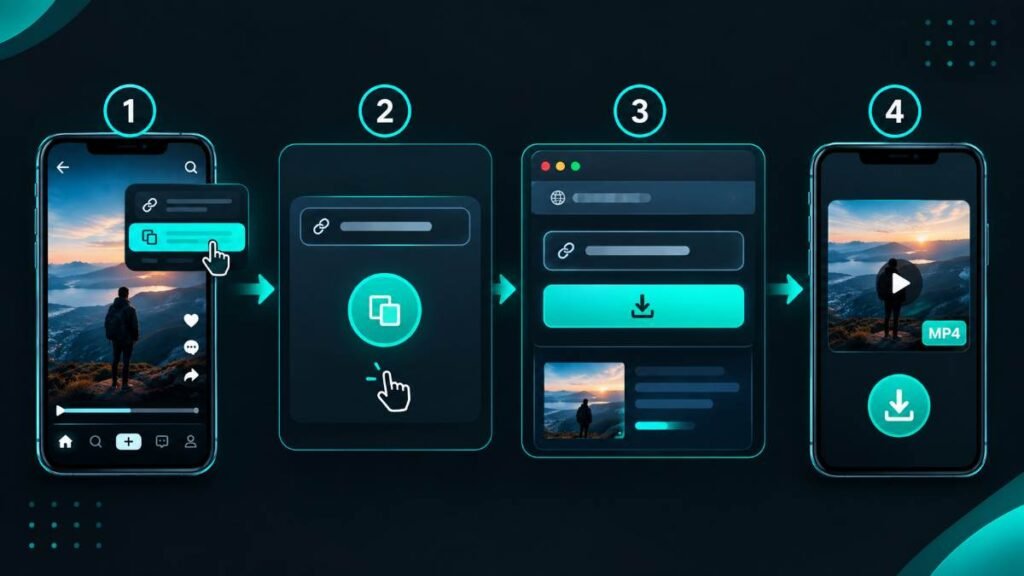
Here’s a straightforward walkthrough that works for most publicly shared TikTok videos.
Step 1: Open TikTok
Launch the TikTok app or visit the TikTok website, then find the video you’d like to save.
Step 2: Copy the Video Link
Tap the Share icon below the video, then select Copy Link. This copies the video’s URL to your clipboard.
Step 3: Open Tok4KDown
Go to Tok4KDown.com in your browser.
Step 4: Paste the TikTok URL
Paste the link you copied into the input field on the site.
Step 5: Start the Download
Click the download button and give the tool a moment to process the video.
Step 6: Save the Video
Once processing is complete, choose the available option and save the MP4 file to your device.
The whole process usually takes less than a minute, and there’s no app installation required.
How to Download TikTok Videos on Android
The steps are largely the same on Android, with a few device-specific notes:
- Open the TikTok app.
- Tap Share, then Copy Link.
- Open your preferred browser (Chrome, for example).
- Go to Tok4KDown.
- Paste the copied link.
- Download the available version of the video.
How to Download TikTok Videos on iPhone
iPhone users can follow a similar process using Safari:
- Open TikTok and copy the video link as described above.
- Open Safari and go to Tok4KDown.
- Paste the link and start the download.
- When prompted, save the file to your device.
Downloaded videos on iPhone are typically saved to the Files app, though this can vary slightly depending on your iOS version and browser settings. If you don’t see the file right away, check the “Downloads” section within Files.
How to Download TikTok Videos on a PC
Windows and Mac users can download TikTok videos through a browser without installing any extra software:
- Open TikTok.com in your browser and find the video.
- Copy the video URL from the address bar or the Share menu.
- Go to Tok4KDown.
- Paste the URL into the input field.
- Let the tool process the video.
- Save the resulting MP4 file to your computer.
On most browsers, downloaded files go straight to your default Downloads folder unless you’ve changed that setting.
Why Use a TikTok Downloader Without Watermark?
There are several legitimate, everyday reasons people look for a cleaner version of a TikTok video:
- Building a personal archive that’s easier to browse without overlays
- Watching content offline, such as during travel
- Saving your own TikTok posts for safekeeping
- Keeping reference clips for personal projects
- Organizing saved videos by topic without visual clutter
None of this involves removing creator credit for the purpose of misrepresenting who made the content. A downloader is a convenience tool, not a license to strip attribution when redistributing someone else’s work.
Is It Legal to Download TikTok Videos Without a Watermark?
This is where nuance matters, and it’s worth reading carefully.
Downloading a video for personal use to watch later, for example is generally treated differently than reposting that same video on another platform, using it commercially, or claiming it as your own.
A few points to keep in mind:
- The original creator retains copyright ownership regardless of who downloads the file.
- Reposting someone else’s content without permission can violate copyright law and TikTok’s own platform rules.
- Commercial use of someone else’s video almost always requires explicit permission.
- TikTok’s Terms of Service govern how content on the platform can be used and redistributed.
How to Download Your Own TikTok Videos Without a Watermark
If the video is yours, saving a clean copy is much more straightforward.
- Keep your original video file before you ever upload it to TikTok this avoids relying on any downloader entirely.
- If you edited the video in an app like CapCut or Premiere Rush, export directly from that app instead of downloading from TikTok afterward.
- If you no longer have the original file, an online downloader can provide a watermark-free copy where supported.
As a general habit, holding on to your original project files is the most reliable way to keep a clean version of your own content.
Common Problems When Downloading TikTok Videos
Even with a simple process, a few hiccups can come up.
Invalid TikTok Link
Double-check that you copied the full video URL using TikTok’s Share option, not a shortened or partial link. Try copying it again if the tool doesn’t recognize it.
Video Cannot Be Found
Videos that have been deleted, set to private, or restricted in certain regions typically can’t be processed by any downloader tool.
Download Button Does Not Work
Try refreshing the page, confirming the link is correct, switching to a different supported browser, or waiting a few minutes before trying again.
Video Quality Is Lower Than Expected
Available quality depends on the original source file and how the video was processed — it isn’t something a downloader can improve beyond the source material.
Downloaded File Cannot Be Found
- Android: Check your Downloads folder via the file manager.
- iPhone: Check the Files app under Downloads.
- Windows: Check your browser’s default Downloads folder.
- Mac: Check the Downloads folder in Finder.
Is Tok4KDown Free?
Tok4KDown.com is designed to be used directly through a browser, without requiring an app installation. For the most accurate and current details on pricing, supported features, or any usage limits, it’s best to check the information listed directly on Tok4KDown.com, since tools like this are periodically updated.
Tips for Safe TikTok Video Downloads
A little caution goes a long way when using any online downloader tool:
- Stick to websites that use HTTPS.
- Close or ignore suspicious pop-ups that appear during the process.
- Avoid installing unknown APKs or browser extensions just to download a video.
- Never enter your TikTok password on a third-party downloader site.
- Scan downloaded files before opening them if you’re unsure of their source.
- Be wary of sites that ask for unnecessary personal information to complete a simple download.
Frequently Asked Questions
How can I download TikTok videos without a watermark?
Copy the video’s share link from TikTok, paste it into an online downloader like Tok4KDown, and select the download option once the video has been processed. The tool provides a version of the file without the standard on-screen branding.
Is Tok4KDown free to use?
Tok4KDown is accessible directly through a browser. For specific details on cost or any limitations, it’s best to check the current information on Tok4KDown.com directly.
Can I download TikTok videos on my phone?
Yes. Both Android and iPhone users can copy a TikTok video link and paste it into a browser-based downloader without needing to install a separate app.
Can I download TikTok videos on iPhone?
Yes, using Safari or another mobile browser. Copy the video link from TikTok’s Share menu, then paste it into the downloader site to save the file.
Can I download TikTok videos on Android?
Yes. The process works the same way as on iPhone — copy the link in the TikTok app, then paste it into a browser-based downloader tool.
Can I download TikTok videos on a PC?
Yes. Windows and Mac users can copy a video link from TikTok.com and paste it into a downloader tool through any modern web browser.
Can I download private TikTok videos?
Generally, no. Most downloader tools can only process publicly accessible videos, since private content isn’t reachable through a standard shareable link.
Is it legal to repost a downloaded TikTok video?
Not without permission. The original creator retains copyright, and reposting their content without consent can violate copyright law and TikTok’s platform rules, regardless of whether a watermark was removed.
Final Thoughts
Downloading TikTok videos without a watermark is simple once you know the steps: copy the video link, paste it into a tool like Tok4KDown.com, and save the file to your device. The process works similarly across Android, iPhone, and PC, and doesn’t require any special technical knowledge.
That said, a cleaner file doesn’t change who owns the content. Always respect creator rights, copyright law, and TikTok’s terms of service when downloading or sharing videos and when a clip isn’t yours, the safest approach is to ask before reposting it anywhere.


